Dispatch
A dispatch board that refuses the bad assignment before it happens.
Unassigned orders, planned trips, available drivers and equipment on one screen. Dispatchers drag work into trips, and TMSWORX checks every assignment against licences, endorsements, equipment status and conflicts before it is saved.
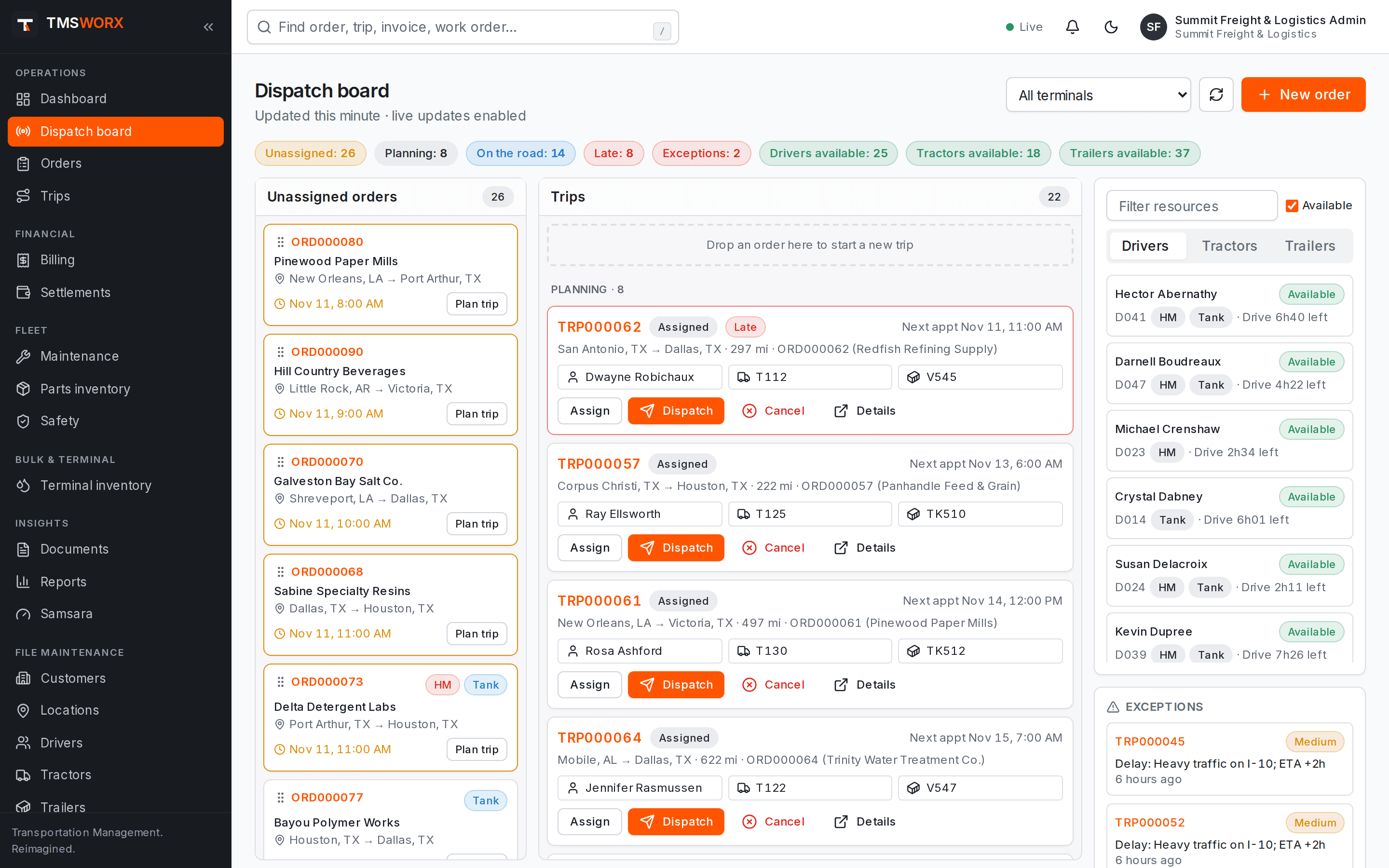
Actual application screenshots. Demonstration company, fictional data.
Included in every cloud plan
01
One shared picture
Every dispatcher sees the same board. Changes made by one person appear for everyone without refreshing.
02
Fewer assignment mistakes
Expired CDLs and medical cards, missing hazmat or tanker endorsements, out-of-service units and double bookings are blocked with a clear reason.
03
Exceptions in view
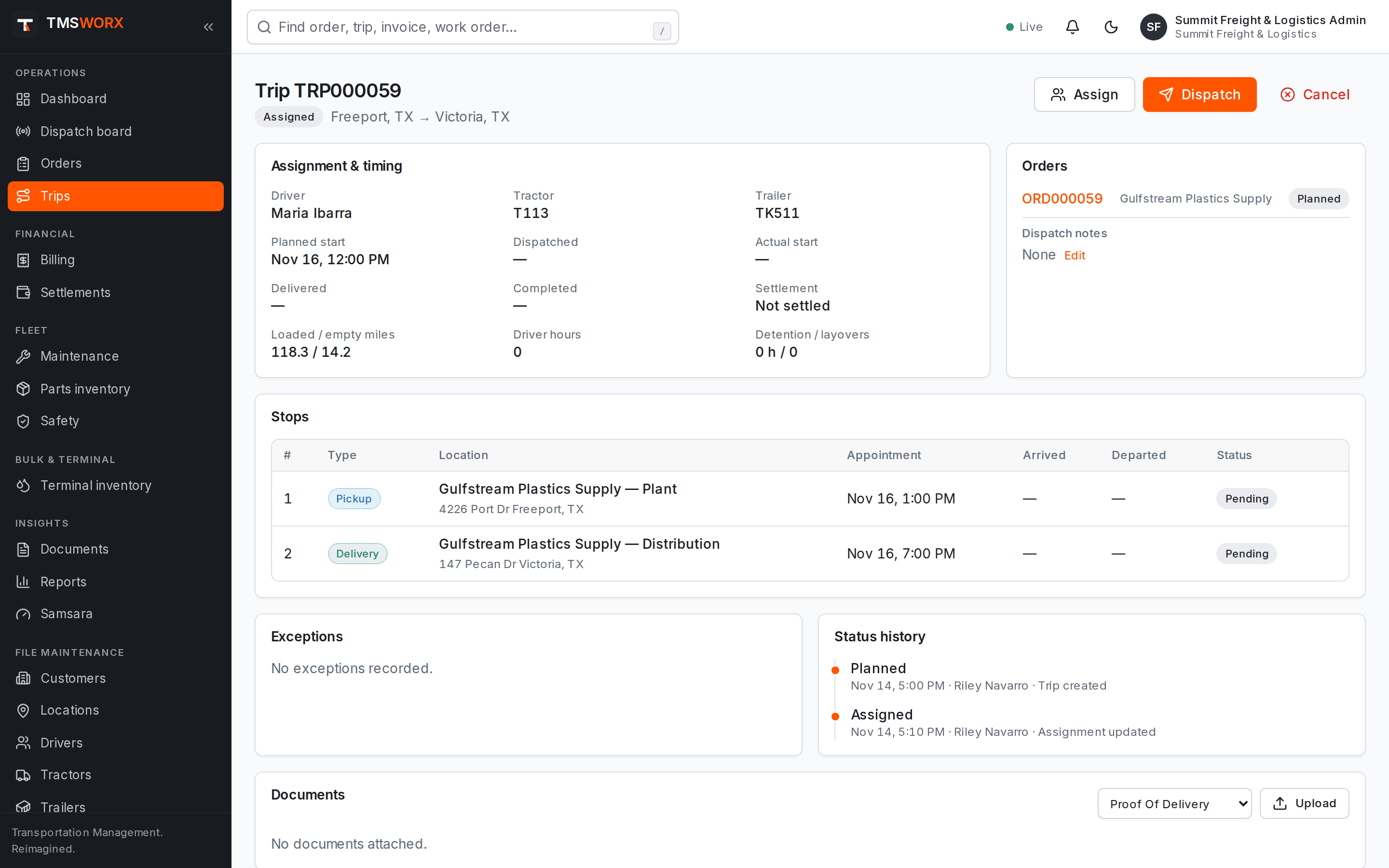
Delays, breakdowns and missed appointments are logged against the trip and surface on the board until they are resolved.
Plan trips from the order queue
Drag an unassigned order onto the board to start a trip, or combine orders into one movement. Filter by terminal to focus on your region.
- Unassigned, planning, on-the-road and late counters
- Drag-and-drop trip planning
- Terminal filter for multi-terminal fleets
- Next appointment and lane shown on each trip
Assign with built-in safeguards
Choose a driver, tractor and trailer from the resource panel. Each choice is validated by the server, so the same rules apply on every screen and to every user.
- CDL and medical certificate expiry checks
- Hazmat and tanker endorsement checks
- Hazmat-rated and tank trailer requirements
- Out-of-service and open out-of-service work order blocks
- Conflict detection when a resource is already on another trip
- CDL and medical certificate expiry checks
- Hazmat and tanker endorsement checks
- Hazmat-rated and tank trailer requirements
- Out-of-service and open out-of-service work order blocks
- Conflict detection when a resource is already on another trip
Recommendations that show their reasoning
Ask for recommendations on any unassigned load and TMSWORX ranks drivers, tractors and trailers, with the reasons behind each score. A dispatcher always makes the choice. Planning a load never dispatches it.
- Estimated empty miles to the pickup from GPS, the last delivery or the home terminal
- Hours-of-service drive time from your ELD compared with the work
- Pickup-window, experience and home-terminal factors with adjustable weights
- Ineligible drivers and units listed with the reason
- Accepting a warning needs permission and a recorded reason
- Estimated empty miles to the pickup from GPS, the last delivery or the home terminal
- Hours-of-service drive time from your ELD compared with the work
- Pickup-window, experience and home-terminal factors with adjustable weights
- Ineligible drivers and units listed with the reason
- Accepting a warning needs permission and a recorded reason
Automation rules
Tell the right people when something happens: a tender arrives, a POD is uploaded, a load is ready to bill, a credential or PM is coming due, or a customer tank runs low. Rules notify a role or create a follow-up task; they never change loads, pay or invoices on their own.
- Event and date-based triggers
- Filters by customer, commodity and document type
- In-app notifications and tasks by role
- Full history of every rule that fired
- Event and date-based triggers
- Filters by customer, commodity and document type
- In-app notifications and tasks by role
- Full history of every rule that fired
Driver timeline
Switch the board to a timeline to see every driver's planned and moving trips across the next three days, with unassigned trips and overdue work highlighted.
- One row per driver across three days
- Planned, assigned and moving trips by color
- Overdue trips drawn up to the current time
- One row per driver across three days
- Planned, assigned and moving trips by color
- Overdue trips drawn up to the current time
Track every stop
Record arrivals and departures for each stop. Trip status moves from planned through dispatched, loaded, in transit and delivered, with a complete status history.
- Stop-level arrive and depart times
- Trip status history with user and time
- Exception logging with severity
- Concurrent editing protection for busy dispatch desks
- Stop-level arrive and depart times
- Trip status history with user and time
- Exception logging with severity
- Concurrent editing protection for busy dispatch desks
How it flows
Dispatch in the life of a load
- 01
Order becomes available
- 02
Trip planned on the board
- 03
Driver and equipment validated
- 04
Dispatched
- 05
Stops arrived and departed
- 06
Delivered and ready to bill
Connected modules
Works with the rest of TMSWORX
Questions
Frequently asked
Can two dispatchers work the board at the same time?
Yes. The board updates live for every signed-in dispatcher, and assignments are protected against conflicting simultaneous edits.
Can a dispatcher override a blocked assignment?
No. Blocks such as an expired licence or an out-of-service tractor are enforced on the server. Fix the underlying record and the assignment can be made.
Does TMSWORX dispatch loads automatically?
No. Recommendations rank and explain the options, but a person chooses. Planning creates a planned trip, and dispatching it is a separate step. Hours of service come from your ELD and are a planning aid only.
Ready to modernize your transportation operation?
See TMSWORX with your own lanes, equipment and workflows in mind. We will walk through dispatch, billing and the modules that matter to your fleet.